

Your timesheet, with a memory.
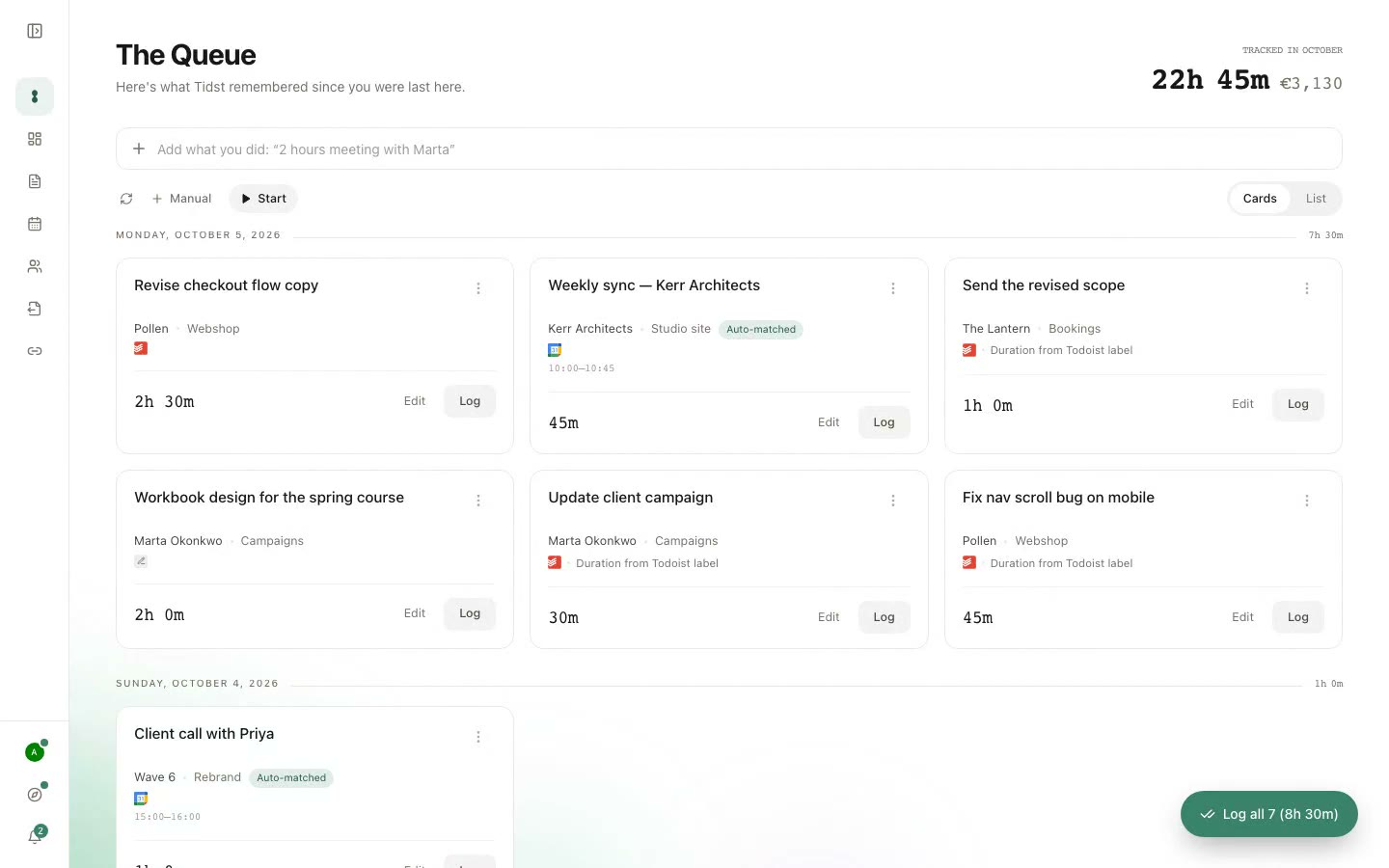
The Queue is where Tidst keeps the work you may want to log later. A completed task. A client meeting from your calendar. A task with a duration already filled in.
Instead of starting with a blank timesheet, you start with work that already happened.
No credit card · Built for freelancers
Why The Queue exists
Work is easy to do and easy to forget.
Freelance days are rarely tidy. You finish a task, jump into a call, answer something quickly, move on to another client and eventually forget half the small things that happened.
Most time trackers ask you to record the time while the work is happening. The Queue starts afterwards, with the traces your work already left, and gives you something concrete to review.
What can appear in The Queue?


Finished tasks
Connect a project, board or list from the task app you already use, and the tasks you finish there can appear in The Queue. Ticked off, moved to Done or set to Complete, depending on the app. If the task carries a duration tag, the duration comes with it.
Calendar meetings
Connect Google Calendar or Outlook and relevant client meetings join the same Queue. A meeting already has a start and an end, so its length is known, and Tidst matches it to a client from its title and who was invited.
Lines you type
For the work that never became a task, type a line like 40 min call with Wave 6. Tidst reads the duration, the client and the day, and the line waits in The Queue like everything else.
Nothing gets logged by accident.
The Queue is a review step.
Tidst can remember that work happened. You still decide what belongs on the timesheet.
For each item you can:
- confirm or change the duration
- choose the right client or project
- mark it billable or non-billable
- log it, edit it or dismiss it
If Tidst found something that does not belong on your timesheet, leave it out. That decision stays with you.
Some items are ready. Others need a little help.
Not every Queue item arrives with the same amount of information. A calendar meeting may already have its duration. A task tagged 30min may be ready too. For the rest, Tidst can suggest a duration from similar work you logged before, or you pick one.

Review it your way.
Some days there are two things waiting. Other days there are twenty.
- Cards
- Better when you want to deal with one item at a time. Each item gets room for the information and actions you need.
- List
- Better when you have more waiting and want to scan quickly. Same Queue. Same data. Less space.
Tidst remembers which view you prefer.
Log several ready items at once.
If multiple Queue items already have the information they need, you should not have to click through each one individually. Use Log all for ready items and deal separately with anything that still needs attention.
Duration tags make The Queue faster.
If you already know roughly how long a task took, tag it before completing it. Every task app Tidst connects to supports this, except Google Tasks:
Tidst can use that label to fill in the duration when the task reaches The Queue. You still review it before logging.
That small hint can turn “How long did that take again?” into “Yep. 30 minutes. Log it.”
The Queue does not see everything.
Tidst is not an activity tracker. It does not monitor your screen, browser history or applications.
If a spontaneous phone call never became a task or calendar event, The Queue cannot magically know it happened. For that work, type a line, use the timer or add a manual entry.
The Queue remembers what your connected tools already know. The rest of your day is yours to add.
A Friday without The Queue
You sit down to finish your timesheet. You check your task app, your calendar, Slack, email, notes, maybe your browser history.
You try to remember whether something happened on Tuesday or Wednesday. You estimate a few durations.
You probably forget something.
A Friday with The Queue
Open Tidst. Your recent completed tasks are waiting. Relevant meetings are there too.
Some already have durations. A few need you to choose one.
Review them, log what belongs and move on.
There is still some time tracking left to do. It just starts from a list instead of a blank page.
From Queue to timesheet
Once an item is logged, it leaves The Queue and becomes part of your registered time. You can see it day by day on the Timesheet, and it counts in client and project totals, reports, live client links, PDF and CSV exports, and the billing extract you hand to whatever issues your invoices.
FAQ
- Does everything Tidst finds have to be logged?
- No. The Queue is there for review. You choose what gets logged and what gets dismissed.
- Does The Queue automatically know the duration?
- Often. A calendar meeting brings its scheduled length. A task tagged with a duration like 30min arrives with it filled in, and a ClickUp task brings its Time tracked or Time Estimate. Otherwise Tidst can suggest a duration from similar work you logged before, or you pick one.
- Does every completed task appear in The Queue?
- No. Only finished work from the projects, boards and lists you choose to watch can appear. Your personal projects stay out of your timesheet.
- Can calendar meetings appear in The Queue?
- Yes. Relevant meetings from connected Google Calendar and Outlook calendars can appear for review with their scheduled duration.
- What about work that never became a task?
- Type it. A line like "40 min call with Wave 6" becomes a Queue item with the duration and client filled in. The timer and manual entries work too.
- Can I switch between cards and list view?
- Yes. Both views show the same Queue data. Choose whichever is easier for the amount of work waiting, and Tidst remembers which one you prefer.
- Can I edit an item before logging it?
- Yes. You can adjust the duration and other relevant details before turning the Queue item into logged time.
The Queue remembers so you do not have to start from scratch.
Finish the work. Let Tidst remember what it can. Review it when you are ready.
No trial · No credit card
Or see how the rest of Tidst works.